Showing posts with label ATOPNUC Mini PC. Show all posts

Friday, February 17, 2023

A Quick Deal Comparison: ATOPNUC Mini PC vs. PicoPC

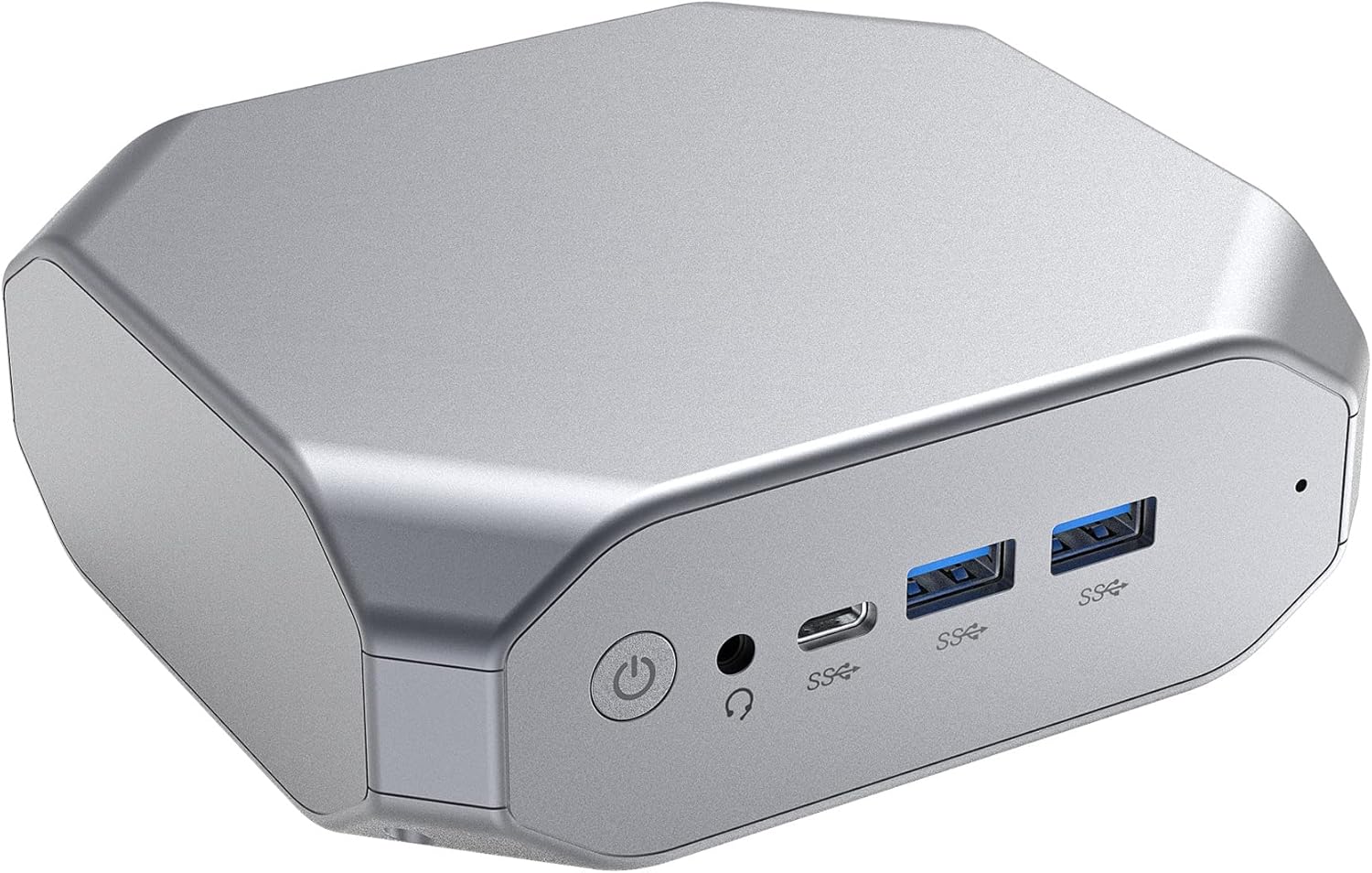
I've been watching a thing on IndieGoGo, and wondering how it compares with my increasingly beloved ATOPNUC Mini PC (not an affiliate link).

It's the PicoPC (not an affiliate link), and it looks pretty interesting. But the model with 8Gb of RAM costs twice what I paid for the ATOPNUC with 8Gb of RAM. Is it worth it? Let's compare.

CPU: The PicoPC seems to have a slightly better CPU (Intel Celeron  J4125) than the ATOPNUC (AMD A9-9400). Here's a benchmark comparison.

Footprint: The PicoPC is a little bit smaller than the ATOPNUC, but we're talking about machines that are all smaller (much smaller) than a carton of cigarettes, so I'm not sure that's wildly important..

SSD: The PicoPC base 8GB Ram model comes with a 256Gb SSD, as opposed to the ATOPNUC's 128Gb offering.

Wireless Connectivity: Both machines offer Bluetooth and dual-band wifi.

Ports are where things change dramatically in favor of the ATOPNUC.

Each machine boasts four USB 2 and 3 ports (two of each on the ATOPNUC, three 3s and one 2 on the Pico). 

Each machine also offers an SD card reader.

But the Pico only has one HDMI out port to the ATOPNUC's two.

And the ATOPNUC includes an Ethernet port, while the Pico doesn't.

It's not so much that the ATOPNUC is a "better computer" than the PicoPC as that it's a "better computer for me."

I run two HDMI monitors, so I like having two HDMI ports (especially since there are no other video-output-specific ports on either machine).

And I use Ethernet in preference to wifi, so I obviously want an Ethernet port.

I wouldn't turn down a slightly better CPU or more storage, but I don't need either of those things, and certainly am not interested in paying twice as much for a machine that doesn't meet my video and Ethernet specs.

But the PicoPC might be a "better computer for you." In which case, you should check it out.

Tuesday, January 31, 2023

Computer Update ...

I've been using the ATOPNUC Mini PC as my "daily driver" computer for nearly a month now.

My verdict on it is becoming less and less provisional: It's just a damn good deal at about $100 from Amazon (not an affiliate link).

My original goal was "get and use a Chromebox with 8Gb of RAM, without spending $400+."

I never got there, and I've mostly given up messing with it. I did install FydeOS to a bootable USB drive, but I've barely used it, as I'm suspicious of the whole idea of a non-Google-"managed" ChromeOS fork, especially one that's "managed" from China. I may try some other things later, especially when and if ChromeOS Flex becomes available for the ATOPNUC's processor, but no biggie.

I ended up going with Lubuntu with the LXQt desktop environment versus regular Ubuntu with, I think, Gnome, which came preinstalled on the machine (that's still installed -- I went dual-boot, defaulting to Lubuntu). The main difference is that I had trouble getting regular Ubuntu to configure my desktop the way I like, while LXQt was an easy configuration. In theory, Lubuntu is lighter on resources than Ubuntu. I can't say I've really noticed a difference there in terms of speed, power consumption, etc. I just like it better.

The machine boots up fast, runs well, etc. It cost $50 less than my previous machine, a Raspberry Pi 4B with 8Gb of RAM but with an ARM processor instead of the ATOPNUC's AMD CPU (the latter meaning I can run "real" Chrome instead of Chromium as my browser, with the attendant sync capabilities, DRM handling so I can stream Netflix or whatever, etc.).

I've really had zero significant problems with the machine that I can recall, other than the initial problems caused by auditioning multiple OSes and trying to get boot orders, etc. right. The only ongoing problem I can think of is that the OS occasionally forgets my audio settings. Not on every boot, just every once in a while. When it happens, it takes about two seconds to fix from the volume/mixer control in the always-present bottom task bar. 

Side note:

I've auditioned I don't know how many password managers to replace LastPass, which I no longer trust. I can't recall how many, but I found Dashlane meh/OK and Zoho Vault unsatisfactory for various reasons. Right now I'm on Nordpass. Their "free" plan is plenty for me, the only feature I dislike is having to have an app installed on the machine rather than merely using a Chrome extension, and the only problem I've had with it is that sometimes the Chrome extension doesn't want to load (but since the app is "always on" in my taskbar, I can just grab a password from there if I need to). I may try some others out later.

So, the verdict re-stated: You're not likely to get a better computer than the ATOPNUC for the price. It's not a high-end gaming PC, but it will run Windows 10 (I'm not sure about 11) or any of many Linux variants, and can handle my (and probably your) usual activities such as browsing the Web, watching videos, editing text, etc. It's quiet, it uses very little electricity (almost always less than 20 watts and sometimes less than 10), it's compact, and according to psensor the CPU remains relatively cool even under load, so I figure it will likely last some time.

The only "down side" I can see, and only for some users, is that its built-in SSD "only" stores 128Gb. So if you store a lot of data, you may want to consider an external USB drive, or a replacement internal one, or a cloud storage solution. Personally, I store very little data, and I've got my essentials on an SD card for portability, so this doesn't bother me.

Wednesday, January 11, 2023

An Unintended but Welcome Consequence of Purchasing the ATOPNUC Mini PC

The OS auditions continue apace. I'm reasonably happy with Lubuntu, but burned FydeOS to a USB and may give it something of a try. It's a ChromiumOS variant that raises my security/surveillance hackles a bit because it's a Chinese product aimed at a Chinese audience, though. And I'm still looking at other stuff.

But the big -- OK, actually quite small -- news is that the ATOPNUC Mini PC solves an annoying problem that I didn't expect it to have any impact at all upon.

My work involves a number of specific text files / templates that are updated daily (in the case of RRND) or at least frequently (in the case of media lists for Garrison Center op-ed submissions). And since my preferred text editor doesn't work with e.g. Google Drive, I store those files locally.

Which means that any time I switch computers, I have to do one of three things:

  • Email the files to myself so that I can download the latest versions to the computer I'm switching to;
  • Upload the files to Google Drive or whatever and download them to the computer I'm switching to; or
  • Copy the files to a USB drive and plug it into the computer I'm switching to.
None of which are major tasks, but I do find them annoying.

BUT!

The ATOPNUC has a micro SD card read slot.

And so does my Chromebook, the main other computer I use (e.g. when I travel, or just want to work outside instead of at my desk.

Once I decided the changeover from the Raspberry Pi 4B would be permanent, I had two micro SD cards, each with an OS for that machine on it.

One of those cards, I wiped, burned a clean install of Raspbian OS onto, and stuck in the 4B so that when and if I ever go back to it for anything I'm ready to rumble.

The other one, I formatted, stuck in the ATOPNUC's card slot, and now store those files on.

When I switch computers, all I have to do is pop the card out of one machine and into the other and I'm doing my thing.

Which I suppose I could have done with a USB drive this whole time, but I hate having an ugly USB drive hanging out of my computer, and also if I'm traveling I can lose the USB drive in my luggage or whatever, while the SD card just sits snug as a bug in a rug inside the computer.

So that's a nice little daily work win IMHO.

Friday, January 06, 2023

ATOPNUC Mini PC, OS, and Password Manager Updates

Yesterday was a fairly smooth workday with the new ATOPNUC Mini PC. I was able to do everything I needed to do, and the machine seemed to run faster and more smoothly than the Rapsberry Pi 4B. Which, by the way, it cost only about 2/3 as much as.

So, now it's Friday, which is my "Saturday" in terms of work week, so I have more time to mess around.

At first blush, I did not like the Lubuntu operating system as well as the preinstalled Ubuntu 20.04.5 LTS. The only reason I installed Lubuntu was that I needed to have some other OS to go to after messing up GRUB and not being able to boot into anything except, repetitively, BIOS.

This morning (after wrapping up the morning edition of RRND), I went to work on Lubuntu to see if I could make it faster, friendlier, and more appealing. That turned out to be fairly easy.

I installed Chrome.

I turned off multiple "desktops."

I solved an audio problem which I also have in the other version of Ubuntu -- my sound output settings weren't sticking through reboots.

I set up the task bar to my liking. One thing I don't like about the other Ubuntu version is that it doesn't seem to want to let me put everything -- launcher, statuses, controls, clock --  on the bottom and insists on keeping certain things up top, wasting screen space.

I uninstalled a bunch of software that I do not use and don't ever plan to use.

The result: I think I like Lubuntu better than non-L-Ubuntu now. Everything is running at least as fast as in 20.04.5 LTS, and according to psensor my CPU temperatures are lower and I'm using less CPU and RAM as well. Which probably means I'm also drawing fewer watts (haven't checked that yet). And the desktop looks/feels like what I had been getting quite used to with Manjaro Linux on the Pi.

Still not quite a $100 8Gb Chromebox, but getting there.

I'm on my third password manager try-out now: Zoho Vault. Main features I like about it:

  1. Unlimited passwords on the free version.
  2. Unlimited devices on the free version.
  3. Runs from a browser extension without having to install an app on the computer (that's what I don't like about NordPass).
Outside of passwords, it's not as robust (it won't store credit card info, etc.), but that's fine. I wanted a password manager. It's a password manager.

Wednesday, January 04, 2023

ATOPNUC Mini PC: Impressions After One Full (More or Less) Day of Use

As previously stated, my goal with the ATOPNUC Mini PC was, pretty much, "turn a $100 mini PC into an 8Gb Chromebox instead of paying $400 for an 8Gb Chromebox."

So far, that hasn't quite worked out.

ChromeOS Flex doesn't have a build for this specific model, and a build for another model with the same processor wouldn't boot.

There also doesn't seem to be a ChromiumOS build for this specific model, nor would the generic x86 build boot.

I spent a good chunk of time yesterday downloading "light" Linux distributions, burning them to flash drives, and checking them out. Only one successfully booted, and that was Lubuntu. It's supposed to be a "light" version of Ubuntu, but I can't tell that it's any "lighter" in terms of resource usage than the pre-installed Ubuntu 20.04.5 LTS, and I don't like its GUI, etc. as well.

I spent another good chunk of time yesterday in panic mode after one of these experiments led to me making some boot order changes in Grub Customizer that ended up causing the machine to boot directly into its BIOS/setup screen, and then do that over and over without ever entering into an OS.

I finally (I don't remember how) got it to boot into the "live" USB drive Lubuntu, installed Lubuntu on a newly created hard drive partition, and let it do its automatic Grub setup so that I now have a dual boot machine and a choice of Lubuntu or regular Ubuntu. I'm using the latter. I don't begrudge the additional disk space, as I was always expecting to eventually run two partitions. It's a 128Gb SSD drive, and frankly I store very little information on a drive. I ditch all programs that I don't use. I've never even run short on drive space on the 16Gb SSDs typical of lower-end Chromebooks.

And hey, it's working out. I may eventually put something other than Lubuntu on that second partition, but I'm not in a big hurry now.

I've turned enough extraneous stuff off that my power usage is now much closer to being in line with the Raspberry Pi 4B's. More on that in a minute.

I've installed Google Chrome instead of the Chromium browser. It's visibly faster at rendering sites, has fewer problems with some embedded stuff, and even lets me view DRM-protected material from e.g. Netflix (always a problem trying to straighten out with other browsers in Linux).

I've also installed psensor to keep track of CPU temperatures, and I haven't seen anything about 50 degrees celsius yet.

Now, as to the slightly higher power usage: There's a down side and an up side.

The down side is that given my solar setup (160-watt panel, 300 watt-hour power station), I could conceivably have to plug into wall AC if I use the machine until very late at night such that I don't have enough stored power left over to keep me running in the early morning (pre-dawn) hours when I get my work day started.

The up side is that, hey, if I focus on getting my work done before sundown, turning off the machine will take care of that problem (the panel easily charges the station to 100% given reasonable daylight). Which means I can do things like 1) spend more time hanging with family, 2) actually make it to bed by my target time of 8:30pm, 3) etc., instead of sitting at the fucking computer for not really any good reason.

Over time, I'll continue tweaking the machine and probably experimenting with other operating systems, but so far it is meeting my needs quite well. And I can also recommend it to anyone who's still never tried Linux, would like to, and is afraid to do so on their "daily driver" computer. For about $100, you get a reasonably powerful machine with a very friendly Linux distribution already installed.

Tuesday, January 03, 2023

It's Here, But There Are Delays

My new ATOPNUC Mini PC arrived yesterday, but between work (never change computer horses in midstream) and another home electronics disaster (my television was damaged in a household recombobulation, requiring borrowing a TV from a kid, ordering a new Roku since the borrowed TV isn't "smart," etc.) I didn't have time to do much with it.

First impressions:

  • Booted right up -- and pretty fast.
  • In the past, I've not been a fan of Ubuntu (the preinstalled OS), but I may end up giving it an extended test drive, or at least keep it as part of a dual-boot system. I'd like to do some rearranging of the default desktop/dock stuff, at a minimum, but it seems to run well.
  • No obvious problems, other than it not recognizing one particular USB drive (which may be a problem with the drive). I haven't tried it with dual monitors yet, just messed with it on one screen then put it back into the box until I have time to really futz with things.
  • I ran it straight from an outlet rather than from my solar power station, so I don't know how it is on power usage just yet.
Depending on various things, I may get it fully set up and really start working with it as early as today, or it may be the weekend. My goal is to turn it into a $100 8Gb Chromebox instead of paying $400 for the real thing. But if that doesn't work out, I'm sure I'll find something to do with it, whether it replaces the Raspberry Pi 4B as my "daily driver" or not.

Naturally, after ordering two HDMI cables and finding one around the house, it came with one (not advertised in the description). So I'll have two spare HDMI cables. Whee.

Update, 10am: OK, I've got this thing up and running. Very nice. It wasn't able to boot Chromium OS from a USB (the problem was with the ChromiumOS version, not the machine, I think). I have installed actual Chrome, rather than Chromium (no build of Chrome for the ARM CPU in the Raspberry Pi), and will mess with other OS options later. Unfortunately, it looks like the machine wants to draw 15-20 watts instead of the less than 10 the Pi usually does. But that's the only down side so far (other than that I don't like the little status bar at the top of Ubuntu and haven't figured out how to fix that yet).

Update, 8:30pm: I've spent the day breaking and fixing the machine, including a pretty scary period where, no matter what I did, it booted into BIOS (and reloaded BIOS when BIOS was exited). So far the only alternative OS I've been able to get to work on the ATOPNUC is LUbuntu, which is supposed to be a "lighter" version of Ubuntu. But it seems at least as "heavy" as the other version of Ubuntu, and I don't like its desktop environment as well. I also see that once I turned off stuff I didn't need to be running (Wifi, Bluetooth, etc.), the machine doesn't draw a whole lot more power than the Raspberry Pi. Right now, with Chrome running and eight tabs open, 10-11 watts. So this thing may just work out.

Thursday, December 29, 2022

Next Up in the Never-Ending Quest for My Ideal Desktop Machine ...

... is the ATOPNUC Mini PC. About $105 including tax and a $10-off coupon at Amazon (not an affiliate link). That's for the model with Ubuntu instead of Windows 10, and with 8Gb of RAM instead of 4. Call it my Christmas present to myself, although it won't be here until next week.


I've been using the Raspberry Pi 4B as my "daily driver" desktop machine since August of 2021 and I can't say I'm terribly unhappy with it.

But what I really want is: An 8Gb Chromebox that doesn't cost several hundred dollars.

Why? Because other than an occasional game of a Connect 4 clone, I don't really use the operating system.

I've gone through 32-bit Raspbian, 64-bit Raspberry Pi OS (which was buggy and kept freezing), Manjaro Linux in both KDE Plasma and xfce desktop editions. And all of them are just more operating system, using more resources, than I need. I use 1) the Chromium or Chrome browser, and 2) a text editor that's a Chrome/Chromium extension. Or, to put it a different way, I'm using the features of a Chromebook or Chromebox, with a bunch of other resource-consuming crap just taking up space and CPU time.

Last week, I tried installing the Raspberry Pi build of ChromiumOS, and it was just dreamy -- except that some things simply didn't work, and I was unable to successfully troubleshoot them.

I'm hoping that ChromiumOS (or ChromeOS Flex, if there's a build for this  AMD 9400 CPU , which there may or may not be) will work on this new machine.

It's got a small physical footprint, which I like.

It's got two HDMI out ports, so I won't need adapters, etc. to use it with my two monitors.

I am a little worried about its power consumption. Its power supply is 12 volt/3 amp, so it could conceivably draw up to 36 watts, while the Pi hardly ever breaks 10 watts even under load, and I'm trying to run entirely from solar power via a 160-watt panel and 300 watt-hour power station.

I guess we'll see. Worse comes to worst, it will end up as yet another project machine for my son to turn into a weird retro gaming box or something. But I'm hoping for the best.